  • Appointments
  • Careers
  • Patient Portal
    • Get to know MyChart
  • Pay my Bill
  • Referrals
Main Menu
  • Find a Provider
    • Browse Physicians
    • Browse Nurse Practitioners
    • Browse Physician Assistants
  • Services and Resources
    • Cancer clinical trials
    • Cancer treatment options
    • Cancer types
  • Locations
  • Your visit
    • Preparing for your first appointment
    • Cancer support services
    • Treatment handbook
  • More
    • About Us
      • Core Values
      • Retired Physicians
    • Patient Stories and News
    • Our Foundation
  • Find a Provider
    • Browse Physicians
    • Browse Nurse Practitioners
    • Browse Physician Assistants
  • Services and Resources
    • Cancer clinical trials
    • Cancer treatment options
    • Cancer types
  • Locations
  • Your visit
    • Preparing for your first appointment
    • Cancer support services
    • Treatment handbook
  • More
    • About Us
      • Core Values
      • Retired Physicians
    • Patient Stories and News
    • Our Foundation
  • Appointments
  • Careers
  • Patient Portal
    • Get to know MyChart
  • Pay my Bill
  • Referrals
Breadcrumb
  1. Home
  2. eCheck-in with MyChart
Email eCheck-in with MyChart
Share eCheck-in with MyChart on Facebook
Share eCheck-in with MyChart on Twitter
Share eCheck-in with MyChart on LinkedIn
Print eCheck-in with MyChart

eCheck-in with MyChart

eCheck-in is the newest feature on MyChart, our online tool for patients.

You can use eCheck-in a few days before a scheduled appointment to answer important questions about:

  • Your health history
  • Your current symptoms
  • Prescription medications you’re using
  • Your current insurance plan
  • Your emergency contacts

Usually information about these topics is collected in the waiting room right before an appointment. By using eCheck-in, you can simply confirm or adjust the information we already have on file and submit the information from home or by smartphone, any time before your appointment.

When you receive your reminder notice about an upcoming appointment, you’ll be encouraged to log in to MyChart and use eCheck-in. Not on MyChart? Go to the MyChart page and click the “sign up now” button.
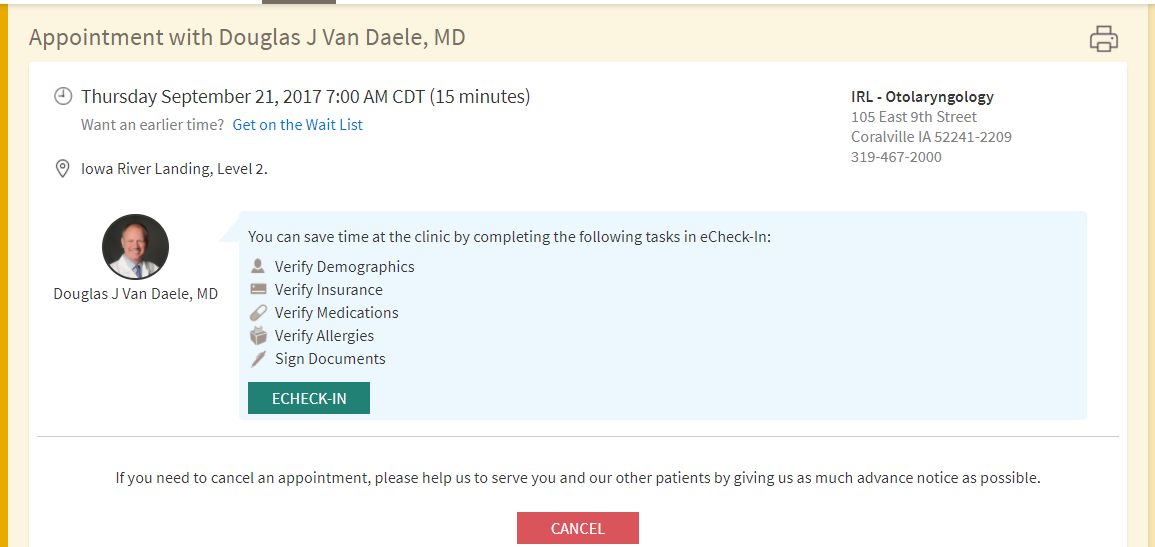
Screen shot of eCheck-in feature on MyChart
View of the MyChart eCheck-in feature: Patients will find this option in their MyChart account under their upcoming appointments.
Sidebar content
New to MyChart?

MyChart is an easy way to manage your health care from the comfort of home.

  • Learn more about MyChart
  • Login to MyChart
  • Facebook
  • LinkedIn
  • Instagram
    • Request an appointment
    • Browse locations
    • Browse providers
    • Browse medical services
    1-515-282-2921

    Patients and Visitors

    • Your visit to Mission Cancer + Blood
    • MyChart
    • Contact us
    • Share your story
    • Patient financial resources
    • Educational resources and support groups

    Medical Professionals

    • Clinical trials
    • Resources for referring providers
    • Refer a patient online

    Employees & Community

    • Careers
    • About us
    • News and patient stories
    • Our foundation
    • Nondiscrimination Notice
    • HIPAA Notice of Privacy Practices
    • Web Privacy Policy
    • Accessibility
    Copyright © 2026

    The University of Iowa. All Rights Reserved.